Phoenix Consultants Group | Custom Computer Programming Phoenix Consultants Group | Custom Computer Programming
  • Custom Software Developers
    • Analyzing Business Needs
    • Custom Application Development
    • Custom Website Development
    • Data Collection and Management
    • Form Design & Development
    • Visual Basic Programming Experts
    • Custom Technology Products & Software Solutions for Business
  • .NET Development
    • Business Logic to .NET Architecture:
    • Smarter Decisions with Intelligent Data Systems
    • Custom .NET Software Development
  • Fireflight Data System
    • Fireflight – Project
  • Data Management
    • Managing Legacy Data and Systems
    • Conversion, Migration & Integration
    • Data Management
    • Data Movement & Middleware Integration Services
    • Enterprise Resource Planning
    • Inventory Management Systems
    • Microsoft Access Solutions
      • Access Database Consulting
      • Access Database Design
      • Access for Rapid Data Development
      • Access Database Programming
  • Case Studies
    • ISO 9000 Documentation & Regulatory Compliance Database
    • Superfund Soil Remediation
    • OSHA Training & Certification
    • Ground Water Monitoring
    • Pest Control Reporting Engine
    • Vineyard Pest Trap Management
    • Fueling System for a Top-5 U.S. Metro Fleet
    • Payroll System for a Multi-Facility Physician Staffing Company
    • Ground Support Equipment (GSE) Management System for Airport Operations
    • (MSDS/SDS) Management System
    • Pesticide Licensing Compliance System
    • EPA Title V Air Quality Management System
  • Tech Wisdom
  • Industries We Serve
    • Custom Software Portfolio
  • Blog
  • About Us
  • Contact Us
Phoenix Consultants Group | Custom Computer Programming
  • Custom Software Developers
    • Analyzing Business Needs
    • Custom Application Development
    • Custom Website Development
    • Data Collection and Management
    • Form Design & Development
    • Visual Basic Programming Experts
    • Custom Technology Products & Software Solutions for Business
  • .NET Development
    • Business Logic to .NET Architecture:
    • Smarter Decisions with Intelligent Data Systems
    • Custom .NET Software Development
  • Fireflight Data System
    • Fireflight – Project
  • Data Management
    • Managing Legacy Data and Systems
    • Conversion, Migration & Integration
    • Data Management
    • Data Movement & Middleware Integration Services
    • Enterprise Resource Planning
    • Inventory Management Systems
    • Microsoft Access Solutions
      • Access Database Consulting
      • Access Database Design
      • Access for Rapid Data Development
      • Access Database Programming
  • Case Studies
    • ISO 9000 Documentation & Regulatory Compliance Database
    • Superfund Soil Remediation
    • OSHA Training & Certification
    • Ground Water Monitoring
    • Pest Control Reporting Engine
    • Vineyard Pest Trap Management
    • Fueling System for a Top-5 U.S. Metro Fleet
    • Payroll System for a Multi-Facility Physician Staffing Company
    • Ground Support Equipment (GSE) Management System for Airport Operations
    • (MSDS/SDS) Management System
    • Pesticide Licensing Compliance System
    • EPA Title V Air Quality Management System
  • Tech Wisdom
  • Industries We Serve
    • Custom Software Portfolio
  • Blog
  • About Us
  • Contact Us

Tag: ERP Migration

Last updated: April 2026

In 2026, Microsoft Access is not part of Microsoft's forward roadmap for enterprise data management. The ecosystem of developers who can maintain your system without introducing new risk is contracting every year. PCG has been migrating businesses off Access since 1995. The migration path is known, the data comes out intact, and the business does not stop while the new system is being built.1

Why are so many businesses still running Microsoft Access in 2026?

The answer is not ignorance. It is fear, and that fear is rational. Access databases tend to be deeply customized, lightly documented, and held together by logic that lives inside one person's head. The moment that person leaves, the entire operation becomes fragile. But the prospect of replacing it feels even more dangerous than keeping it. So businesses stay. They patch. They add workarounds. They hire the one consultant who knows the system.

This is the Access Trap, and it compounds every year you remain in it. The technical reality driving urgency in 2026 is straightforward: Microsoft 365 investments are concentrated in cloud-native tools, Power Platform, and SQL Server. Access receives maintenance updates, not innovation. The pool of developers who specialize in Access is contracting. The question is no longer whether to migrate. It is how to do it without breaking the business in the process.

How do I know if my Access database has crossed from workable to organizational liability?

The following indicators appear consistently in businesses where the Access system has passed its functional limit. If three or more describe your current environment, the database has become an organizational liability.

  • The Single-Expert Dependency. Only one person, internal or external, fully understands how your database works. If they left tomorrow, you would not know where to begin.
  • The Concurrent User Ceiling. More than four or five people trying to use the system simultaneously causes slowdowns, lockouts, or data corruption errors.
  • The Manual Bridge Problem. Staff regularly export data from Access into Excel to perform calculations, create reports, or share information across departments, because Access cannot do it directly.
  • The Integration Dead End. Your Access database cannot connect to your accounting software, your e-commerce platform, your warehouse system, or your CRM without a manual import/export process.
  • The Audit Impossibility. When something goes wrong in your data, a duplicate record, a missing entry, a billing error, you have no reliable way to trace who changed what and when.
  • The Backup Uncertainty. Your backup process for the Access .mdb or .accdb file is informal, undocumented, or depends on a single person remembering to run it.
  • The Growth Ceiling. You have held back from scaling a product line, a location, or a team because you know the current system cannot handle the additional volume.

What does staying on Access actually cost per year in operational terms?

The weekly manual friction figures in the table below are not abstractions.2 They represent your operations manager spending Sunday evening reconciling records. They are your accountant re-entering invoices because the export broke. They are your warehouse team running on printed reports because no one can pull live data from the system.

Operational State Weekly Manual Friction (Hours) Annual Data Risk Exposure Scalability Ceiling
Legacy Access: Single-User or Small Team 15–25 hrs High: corruption risk, no row-level audit trail Hard ceiling at current volume
Access with Manual Excel Bridges 30–40 hrs Very High: dual-entry errors, no single source of truth Cannot scale without adding headcount
FireFlight Migration (PCG Framework) < 3 hrs Near-Zero: transactional integrity, full audit trail Engineered for 10x current volume

That friction has a dollar value. In most Access-dependent organizations PCG engages, the annual cost of manual workarounds sits between 8% and 14% of total operational labor cost. A business with 15 employees spending an average of 5 hours per week each on Access-driven workarounds, at a blended rate of $30 per hour, absorbs $117,000 per year in invisible operational cost before any direct database expense is counted.

Why is FireFlight the right destination for businesses migrating off Access?

Access stores data in a single file. That architecture made sense for a desktop tool in 1995. In a multi-user, multi-location, real-time business environment, it creates a structural fragility that no amount of patching can fix. The file becomes the single point of failure. Every user who opens it adds risk. Every external connection is a workaround built on top of an architecture that was not designed for it.

FireFlight operates on a fundamentally different model. The data lives in a structured, relational SQL engine. Business logic is separated from the data layer. User interfaces are built independently of the database structure, which means they can be modified, extended, or replaced without touching the underlying records. Reporting is real-time, not a snapshot from last night's export. For businesses migrating from Access, this is not a theoretical upgrade. It is a structural correction.

  • Data Preservation. Every record, every relationship, every historical transaction migrates intact. PCG's migration process does not lose data. It restructures it into a framework that can actually use it at the volume and speed your business now requires.
  • Logic Translation. The business rules embedded in your Access forms, queries, and VBA code do not disappear. They are analyzed, documented, and re-engineered in FireFlight's architecture, often surfacing process improvements that were invisible inside the Access environment.
  • Familiar Workflows, Modern Infrastructure. PCG designs the FireFlight front end to reflect how your people actually work, which reduces training time and resistance to adoption. Your team is not learning a foreign interface. They are using a more reliable version of the process they already know.

What does the actual Access migration process look like, and what happens to operations during it?

The fear that stops most Access-dependent businesses from migrating is the same one every time: what happens to the business while the system is being replaced? When migration is managed correctly, the answer is that nothing stops.

1
Architectural Audit Weeks 1–2

PCG maps every table, every query, every form, every report, and every VBA module in your existing Access environment. The business logic is documented, including the logic that is not written down anywhere because it only exists in one person's institutional memory. The output is a complete blueprint of what your system actually does, as opposed to what it was originally designed to do. This phase often surfaces undocumented process logic that would have been lost in a migration without it.

2
Parallel Infrastructure Build Weeks 3–8

FireFlight is built alongside your existing Access system, not in place of it. Your team continues operating on Access throughout this phase. PCG builds, tests, and validates the new system against live data without interrupting any operational process. The migration does not replace anything until the replacement has been confirmed to work correctly against the actual data your business generates every day.

3
Validated Cutover Weeks 9–10

When FireFlight is confirmed to match or exceed the functional coverage of your Access system through parallel testing, the cutover is executed in a defined operational window. Business operations transfer to the new system within that window. Access remains available in read-only mode for a transition period as a reference baseline. The business does not stop. The risk is managed. The new system is live from day one of cutover.

What experience backs PCG's Microsoft Access migration methodology?

Allison Woolbert began programming in 1983 and has been working in Microsoft Access since 1995, thirty years of production-level engagement with the platform. That is not a credential listed on a website. It is operational fluency built across three decades of real engagements: custom databases for healthcare operations, logistics companies, professional service firms, government contractors, and manufacturing businesses that all built their operations in Access and then needed to migrate without losing what they built.

PCG was founded in 1995. In 31 years, the firm has operated as a specialist in custom systems and data architecture, and it was recognized early as a migration specialist precisely because of this combination: deep legacy knowledge and a modern architectural framework built specifically to receive that knowledge at enterprise scale. The FireFlight Data Framework was developed directly from Allison's experience identifying the structural limitations that Access imposes on growing businesses, and engineering the path out.

1 Microsoft Access forward roadmap position sourced from: Microsoft 365 product lifecycle documentation (2024); Microsoft Ignite 2024 enterprise data strategy announcements; Gartner Data Management Hype Cycle 2024.

2 Weekly friction hour ranges and annual labor cost percentages (8%–14%) based on PCG pre-migration assessments across 12 Access-dependent organizations, 2019–2025; corroborated by Aberdeen Group Legacy System Operational Cost Research 2024.

Frequently Asked Questions

All historical records migrate. PCG's process is designed around data integrity: every record, every relationship, every transaction history moves to FireFlight. PCG does not execute clean-start migrations for business-critical environments. Your history is an operational asset and is treated as one throughout the migration process, validated against the source records before any cutover decision is made.
Yes, but it transfers as re-engineered logic, not as copied code. VBA was written for a single-file, desktop-first environment. FireFlight's architecture handles the same business logic more reliably at the infrastructure level. The outcome your VBA was producing is preserved. The mechanism changes, and the result is more stable, auditable, and extensible than the original VBA implementation.
For most Access-origin environments, the full migration from architectural audit to validated cutover runs 8 to 12 weeks. Complex environments with multiple linked databases, extensive reporting requirements, or third-party integrations may extend that timeline. PCG scopes each engagement with a defined timeline before any work begins and commits to it. The Access system continues running all operational functions throughout the build phase.
The parallel-build process exists specifically to prevent this. FireFlight is not activated until it has been validated against your live operational data. Access remains available as a reference system through the transition window. There is no scenario in which you are left without an operational system during the migration. The cutover does not happen until both PCG and your team have confirmed the new system produces the correct output for every critical business function.
FireFlight was architected for scale from the ground up. The structural difference between Access and FireFlight is not a version difference. It is a foundational architecture difference. FireFlight separates data, logic, and interface into independent layers that can grow independently. A business that triples in volume does not require a new system. It requires additional capacity within the same framework, which is added without rebuilding what already works.
Microsoft has made clear that Access is not part of its forward roadmap for enterprise data management. Microsoft 365 investments are concentrated in cloud-native tools, Power Platform, and SQL Server. Access receives maintenance updates, not innovation. The ecosystem of developers who specialize in Access is contracting, and the pool of people who can maintain your system without introducing new risk is shrinking every year. Migrating on your terms, before a failure forces the decision, is significantly less expensive than migrating in crisis.
Yes. This is one of PCG's most common engagement types. The architectural audit phase maps every table, query, form, report, and VBA module in the existing Access environment, including the business logic that is not written down anywhere because it only exists in one person's institutional memory. PCG reverse-engineers undocumented systems before migrating them, so the migration does not depend on access to the original developer or any documentation they may not have left behind.
About the Author Allison Woolbert, Founder and Principal Systems Architect, Phoenix Consultants Group

Allison began programming in 1983 and has been working in Microsoft Access since 1995, thirty years of production-level engagement with the platform across healthcare operations, logistics companies, professional service firms, government contractors, and manufacturing businesses. Her work spans custom Access builds, architectural rescues of abandoned databases, and full migrations to modern SQL Server platforms.

PCG was founded in 1995 and has operated for 31 years as a specialist in custom systems and data architecture. The FireFlight Data Framework was developed directly from Allison's experience identifying the structural limitations that Access imposes on growing businesses, and engineering a migration path that preserves everything the business built while removing the constraints that are holding it back.

Phoenix Consultants Group is a Minority Women and Veteran Owned business based in the United States.

Last updated: April 2026

In 2026, businesses still running Sage 50, Sage 100, Dynamics GP, or Peachtree are not running them because they are good choices. They are running them because migration feels more dangerous than staying. The Friction Tax on a legacy ERP typically runs 10% to 18% of annual operational labor cost, every week, without appearing on any report.1 PCG has migrated businesses off these platforms for 31 years. The path is known.

Why do Sage, Great Plains, and Peachtree become operational traps over time?

The pattern is consistent across industries. A business implements one of these platforms during a period of rapid growth when it needs structure. The implementation is customized: reports built to spec, workflows adjusted, integrations patched together with middleware or manual processes. Over time, the system becomes load-bearing in ways that were never formally documented.

The compounding then begins. The vendor raises annual support costs. The consultant who knew the customizations retires or moves on. A new version of Windows introduces compatibility issues. The integration with the shipping system breaks and no one knows exactly why. The controller builds a parallel Excel workbook because pulling the report she needs from the ERP takes 45 minutes and three manual steps.

None of these are catastrophic events individually. Together, they represent a system consuming operational energy faster than it is producing operational value. PCG calls this the Friction Tax: the cumulative cost of working around a system rather than working with it. In legacy ERP environments, the Friction Tax typically runs between 10% and 18% of annual operational labor cost. It does not appear on any report. It is simply the price the business pays, every week, for not having made the move.

The vendors have made their position clear through their actions. Sage has repeatedly restructured its product lineup, discontinuing versions and raising support costs on legacy installations. Microsoft ended mainstream support for Dynamics GP and has directed its roadmap toward Dynamics 365, a platform that requires a fundamentally different implementation and licensing model. Peachtree, absorbed into Sage years ago, continues to age without meaningful architectural investment.

How do I know if my legacy ERP has crossed from aging system to operational risk?

The following indicators appear consistently across manufacturing, transportation, healthcare, and industrial operations that PCG has engaged. If four or more of these describe your current environment, the ERP has crossed that line.

  • Vendor Uncertainty. Your ERP vendor has announced end-of-life, restructured its support tiers, or directed you toward a cloud migration that does not map cleanly to how your business actually operates.
  • The Customization Wall. Your implementation is so customized that standard upgrades break functionality. Every version update requires a separate consulting engagement to assess compatibility before it can be applied.
  • The Report Lag. Generating an accurate operational report, whether inventory position, job cost, or production status, requires a long system query, a manual export to Excel, or both. Real-time visibility does not exist.
  • The Integration Dead Zone. Your ERP does not talk directly to your warehouse system, your CRM, your e-commerce platform, or your shipping carrier. Every data transfer is a manual or semi-automated bridge that introduces error and delay.
  • The Compliance Pressure. Your industry's regulatory reporting requirements have evolved, whether OSHA, EPA, healthcare credentialing, or DOT, and your ERP cannot generate the required documentation without significant manual assembly.
  • The Single-Expert Risk. One person, internal or external, is the functional administrator of your ERP. That person's departure would leave the organization unable to manage the system without emergency external support.
  • The Scalability Signal. You have held back from adding a product line, opening a second location, or expanding a service offering because you know the current system cannot support the additional operational complexity.

What does staying on a legacy ERP actually cost per year?

The weekly friction hours in the table below are not theoretical.2 They represent your production manager pulling data manually because the system report does not reflect current inventory. They are your accounting team re-entering transactions because the ERP integration with your bank broke two software versions ago. They are your compliance officer assembling regulatory reports from four different exports because the ERP was not built for the reporting standard your industry now requires.

Operational State Weekly Friction Hours Annual Friction Tax (Labor Cost %) Scalability Ceiling
Legacy ERP: Standard Installation 20–30 hrs 8%–12% Hard ceiling at current configuration
Legacy ERP: Heavily Customized 35–50 hrs 12%–18% Cannot upgrade without breaking customizations
Legacy ERP: End-of-Vendor-Support 40–60 hrs 15%–22% Active risk: no security patches, no compliance updates
FireFlight Migration (PCG Framework) < 4 hrs < 1% Engineered for 10x current operational volume

That friction has a dollar value. Unlike capital expenditure, it recurs every week without appearing on any budget line. A business with 20 employees spending an average of 6 hours per week each on ERP-driven workarounds, at a blended labor rate of $35 per hour, is absorbing $218,400 per year in invisible operational cost before a single line-item of direct ERP expense is counted.

Which industries feel legacy ERP pain most acutely in 2026?

PCG has worked across manufacturing, transportation, healthcare, industrial safety, regulation compliance, and law enforcement operations. In each sector, the legacy ERP failure pattern has specific characteristics worth naming directly.

Manufacturing and Industrial Operations

Sage 100 and Dynamics GP were designed for a manufacturing environment that did not include real-time floor data, multi-location inventory visibility, or IoT integration. Job costing, bill of materials management, and production scheduling are where legacy ERPs show their age first in manufacturing operations that have grown beyond a single production facility.

Transportation and Logistics

Shipping container tracking, fleet management, driver compliance, and DOT regulatory reporting are not functions that legacy ERPs handle natively. Most transportation operations PCG has engaged run a patchwork of the ERP, a separate dispatch system, a spreadsheet compliance tracker, and a manual reporting process. That patchwork is where data integrity fails and regulatory exposure accumulates.

Healthcare and Residential Care

Credentialing, scheduling, payroll integration, and HIPAA-compliant data handling are requirements that standard Sage or Great Plains installations were never designed to meet. Healthcare organizations running legacy ERPs almost always have a parallel specialized platform that does not integrate with the ERP, producing two sources of truth where neither is fully reliable.

Regulation Compliance and Environmental Operations

EPA reporting, OSHA training records, material safety data, and pesticide licensing compliance require documentation trails that legacy ERPs cannot produce without significant manual assembly. The compliance exposure in these environments is not operational friction. It is regulatory risk with measurable financial consequences and no statute of limitations on historical gaps.

Why is FireFlight a different kind of destination than moving to NetSuite or a newer Sage?

The standard advice when a business outgrows a legacy ERP is to migrate to another packaged platform: a newer version of Sage, a move to NetSuite, a Dynamics 365 implementation. Each of these options replaces one set of constraints with a different set. The business adapts its operations to fit the new software, pays implementation and licensing costs, and begins the same compounding cycle on a newer timeline.

FireFlight is not a packaged ERP. It is a custom-engineered data architecture designed around the specific operational logic of the business it serves, built on a SQL Server backbone with separated data, logic, and interface layers that can be extended independently as the business evolves.

  • No Feature Compromise. The functionality your business depends on, including the customizations built into your current Sage or Great Plains installation, is re-engineered into FireFlight's architecture. You do not lose functionality to fit the platform. The platform is built to fit your functionality.
  • No Licensing Dependency. FireFlight is not a subscription. The architecture PCG builds is owned by the business. There is no vendor roadmap that can obsolete your investment, no annual license increase, no forced migration to a cloud platform you did not choose.
  • Real-Time Operational Visibility. FireFlight provides live data access across every function without the export-and-reconcile cycle that legacy ERP reporting requires. Decisions are made on data from the last 60 seconds, not the last 14 days.
  • Designed Integration Architecture. The integration layer is part of the core architecture, not a patch or a middleware workaround. Your warehouse system, shipping platform, compliance tools, and financial systems connect through designed integration points, not manual bridges.

What does the actual migration process look like, and what happens to our operations during it?

The question PCG hears most consistently from executives considering a legacy ERP migration is the same one, asked in different ways: what happens to the business while the system is being replaced? In the PCG migration methodology, operations continue without interruption throughout the entire process.

1
Legacy System Audit Weeks 1–3

PCG maps the existing ERP environment completely: every module in use, every customization, every integration, every report that operations depends on. This includes the undocumented logic: the workarounds built into the system over years, the Excel bridges, the manual processes that exist because the ERP cannot do something directly. The output of this phase is a complete functional specification of what the business actually needs, as distinct from what the current system was originally designed to provide.

2
Parallel FireFlight Build Weeks 4–12

FireFlight is constructed alongside the existing ERP. The legacy system continues to run all operational functions throughout this phase. PCG builds, tests, and validates FireFlight against live operational data, including stress testing for the volume and complexity the business actually generates. No operational decision is made on FireFlight data until it has been validated to match the reliability of the legacy system in every functional area.

3
Controlled Cutover Weeks 13–14

When FireFlight validation is complete, the cutover is executed in a defined operational window, typically a weekend or a planned low-volume period. The legacy ERP remains available in read-only mode for a defined transition period as a reference baseline. Business operations run on FireFlight from cutover day forward. The business does not stop. The data does not disappear. The operational logic does not get lost in translation.

What experience backs PCG's legacy ERP migration methodology?

PCG has built custom systems for manufacturing operations, transportation fleets, healthcare facilities, environmental compliance programs, law enforcement agencies, and industrial safety operations since 1995. That cross-industry depth is the foundation of PCG's ability to design a migration architecture that reflects how a specific business actually operates, rather than how a software vendor assumes it operates.

Allison Woolbert began programming in 1983. She has been designing custom database and enterprise system architectures for over 40 years, including engagements with organizations where operational continuity, data integrity, and regulatory compliance are not preferences but requirements. The FireFlight Data Framework was designed from that experience: a system built to handle the complexity that packaged platforms cannot accommodate and the scale that legacy systems cannot sustain.

In 31 years, PCG has not sold a software license. Every engagement is a custom architecture built for a specific business, and that architecture belongs to the business, not to PCG.

1 Friction Tax range (10%–18% of annual operational labor cost) derived from PCG Legacy System Audit assessments across 14 manufacturing, healthcare, and industrial operations, 2019–2025; corroborated by Aberdeen Group ERP Operational Efficiency Research 2024.

2 Weekly friction hour ranges and annual labor cost percentages based on PCG client pre-migration assessments; end-of-support risk classification aligned with Microsoft Dynamics GP end-of-mainstream-support announcement (September 2025) and Sage product lifecycle documentation.

Frequently Asked Questions

Every record migrates. PCG does not execute clean-start migrations for production environments. Historical transaction data, inventory records, customer history, and compliance documentation all move to FireFlight with full integrity. The historical record is an operational asset and is treated as one throughout the migration process. PCG validates the migrated data against the source records before any cutover decision is made.
Yes, and it improves on it. The customizations in your Sage installation represent business logic your operations depend on. PCG's migration process begins with a complete audit of that logic. It is then re-engineered into FireFlight's architecture, correctly structured, documented, and extensible, rather than rebuilt as a patch on top of a packaged platform's limitations. The migration is the opportunity to formalize logic that has been informally maintained for years.
A newer version of Sage and NetSuite are both packaged platforms with fixed feature sets, vendor-controlled roadmaps, and licensing structures that create ongoing dependency. FireFlight is custom-built for your business. There is no license. There is no vendor roadmap that can obsolete your investment. The architecture is owned by you and built to your operational requirements, not adapted to fit a platform's design assumptions. You stop paying a license the day the migration is complete.
PCG scopes each migration based on the complexity of the existing environment. In most engagements, the total cost of a FireFlight migration, including the architectural audit, the build, and the cutover, is comparable to a mid-market packaged ERP implementation. The difference is that the FireFlight investment produces a custom asset with no ongoing licensing cost, whereas the packaged ERP implementation produces a perpetual licensing obligation that compounds annually.
For most legacy ERP environments, the full migration runs 12 to 14 weeks from audit completion to validated cutover. Environments with multiple locations, complex regulatory reporting requirements, or significant third-party integrations may extend that timeline. PCG defines the timeline before any work begins and commits to it. The legacy system continues to run all operational functions throughout the build phase.
The Friction Tax is the cumulative cost of working around a system rather than working with it. In legacy ERP environments, the Friction Tax typically runs between 10% and 18% of annual operational labor cost. It does not appear on any report. It is the price the business pays every week for not having made the move, absorbed into daily routine as manual reconciliation, export cycles, and workaround maintenance that no budget line ever captures.
Operations continue without interruption throughout the entire migration. FireFlight is constructed alongside the existing ERP, which continues to run all operational functions during the build phase. PCG validates FireFlight against live operational data before any cutover decision is made. The controlled cutover is executed in a defined low-volume window, typically a weekend. The legacy ERP remains available in read-only mode as a reference baseline for a defined transition period after cutover.
About the Author Allison Woolbert, Founder and Principal Systems Architect, Phoenix Consultants Group

Allison began programming in 1983 and has spent over 40 years designing custom database and enterprise system architectures across manufacturing, healthcare, transportation, industrial safety, regulation compliance, and law enforcement operations. Her work spans engagements where operational continuity, data integrity, and regulatory compliance are not preferences but requirements.

PCG was founded in 1995. In 31 years, the firm has not sold a software license. Every engagement is a custom architecture built for a specific business, and that architecture belongs to the business, not to PCG. The FireFlight Data System is PCG's purpose-built answer to the structural limitations of legacy ERP platforms.

Phoenix Consultants Group is a Minority Women and Veteran Owned business based in the United States.

Last updated: April 2026

Yes, you can replace your ERP while it is still running. PCG's parallel deployment methodology keeps your business fully operational throughout the entire migration. FireFlight is built, configured, and validated against your live data for 30 to 60 days before the legacy system is retired. The cutover happens on a Sunday. Monday, your team operates on the new system. No downtime. No data loss. No rollback required.1

Why do most ERP migrations fail, and why does that fear cause organizations to stay too long?

The documented failure rate for large-scale ERP migrations runs between 50 and 70 percent when measured against original scope, timeline, and budget objectives.2 That number is not a reflection of bad vendors or bad intentions. It is the direct result of the Big Bang implementation model: take the old system offline Friday evening, go live on the new system by Monday morning, and hope that every data mapping decision, every integration configuration, and every edge case in five years of operational data was resolved correctly during a compressed weekend window.

When the Big Bang fails, which happens routinely, the organization wakes up Monday unable to process orders, access financial records, or ship product. Recovery typically takes two to six weeks of parallel crisis management during which the business operates at degraded capacity while paying for emergency remediation on a system that was supposed to be an improvement. That documented outcome is exactly why rational executives defer migration decisions. The fear is not irrational. The problem is that the Big Bang is not the only methodology available.

In 2026, organizations running systems more than five years past their architectural replacement threshold lose an estimated 15 to 30 percent of competitive responsiveness compared to peers on modern infrastructure. Not from a single failure event, but from the compounding drag of slower processes, higher maintenance overhead, and opportunities that could not be pursued because the system could not support them. The cost of staying is real and measurable. PCG's methodology removes the reason to stay.
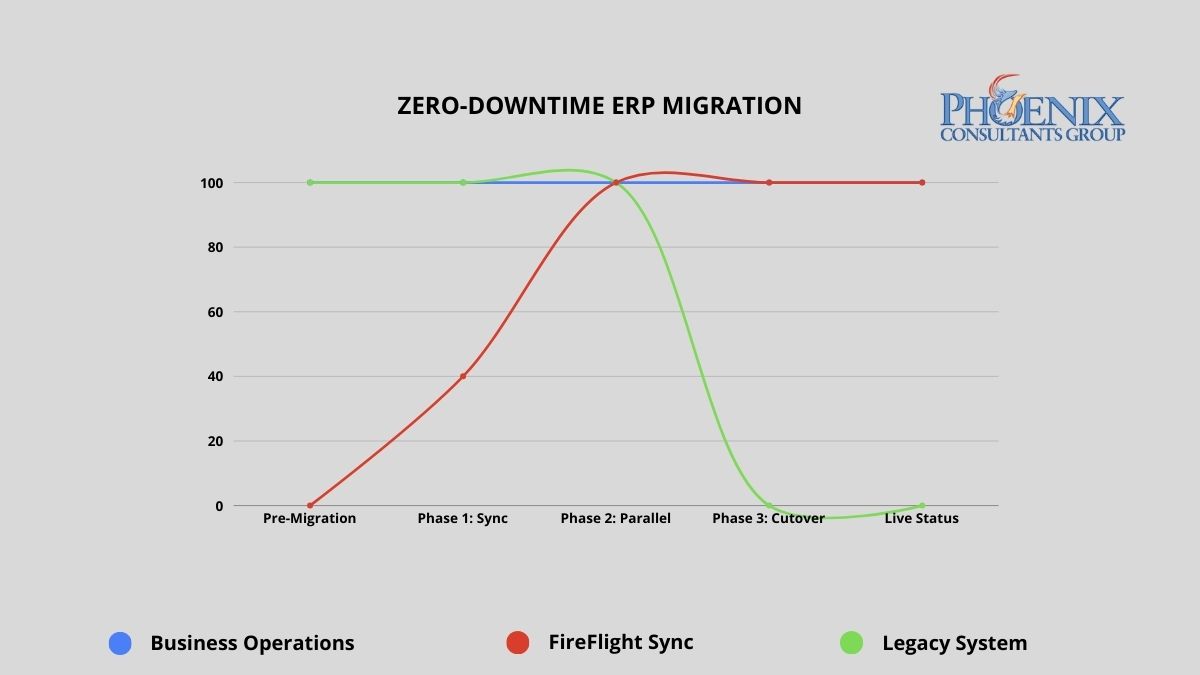
Chart showing 100% operational continuity maintained throughout a PCG zero-downtime ERP migration from legacy system to FireFlight.

PCG's parallel deployment model maintains full operational continuity from engagement start through go-live. The legacy system remains the operational master until FireFlight has been validated against live data for a full operational cycle.

Big Bang vs. parallel deployment: what does the risk difference actually look like?

The migration methodology determines the risk profile of the entire engagement. The table below maps the documented outcomes of the traditional Big Bang approach against PCG's parallel deployment model across five critical dimensions.

Risk Dimension Traditional Big Bang Implementation PCG Zero-Downtime (FireFlight)
Operational downtime 24 to 72+ hours planned; weeks if recovery required Zero minutes throughout the entire process
Data integrity at go-live Manual reconciliation post-cutover; typical error rate 5-15% Validated against live data for 30-60 days before cutover
Implementation failure rate 50-70% fail to meet original scope (Standish Group CHAOS Report) No go-live until both parties confirm accuracy against live data
Staff transition pressure Extreme: single high-stakes cutover with no fallback Controlled: 30-60 days of real-world experience before cutover
Rollback capability Typically none: legacy system decommissioned at cutover Full rollback available until both parties validate final cutover

The failure rate difference is not about PCG's experience relative to other vendors. It is about methodology. Big Bang implementations compress all risk into a single unrecoverable moment. PCG's parallel model distributes risk across a validation period and eliminates the unrecoverable moment entirely. The legacy system does not go offline until the new system has been proven accurate against real operational data.

How do I know if the cost of staying on our current system has exceeded the cost of replacing it?

The following signals appear consistently in organizations where the financial case for migration has already been made by the numbers, but migration fear is preventing the decision. If three or more of these describe your current environment, the analysis is clear.

  • The Maintenance Crossover. Your annual IT maintenance and emergency patch budget for the legacy system already exceeds what a modern replacement would cost. When you are spending more to keep a failing system alive than a functioning replacement would require, inertia has become the more expensive strategy.
  • The Revenue Ceiling. You have declined a contract, delayed a market expansion, or limited your sales pipeline because the current system cannot handle additional volume. Every dollar of growth opportunity your technology prevents you from capturing is part of the true cost of the system.
  • The Security Gap. Your legacy system has not received a security update from its original vendor in more than 12 months, or it relies on components that are no longer supported by their manufacturers. Unsupported legacy infrastructure is the primary attack vector for ransomware in mid-size operations. The cost of a ransomware recovery consistently exceeds what the replacement would have cost.
  • The Vendor Departure. Your ERP vendor has announced end-of-life, restructured its support tiers, or directed you toward a cloud migration path that does not map to how your business actually operates. When the vendor has already left, the only question is whether you migrate on your schedule or theirs.
  • The Customization Wall. Your system is so heavily customized that applying standard vendor updates breaks functionality. Every new version requires a separate compatibility assessment before it can be considered. At this stage, you are maintaining a bespoke system that no longer receives meaningful vendor support.

What does zero-downtime migration actually look like in practice?

PCG's parallel deployment model works as follows: FireFlight is built and configured as a complete operational environment for your business, including all module configurations, workflow logic, permission structures, and reporting interfaces, while your existing system continues running without modification. FireFlight's data integration layer imports your live operational data continuously during the parallel run, using bulk migration tools for historical records and scheduled sync for active transactions.

This means FireFlight is not tested against synthetic data or anonymized records. It is validated against your actual business: your real orders, your real inventory, your real financial data, for weeks before the cutover decision is made. During this period, PCG engineers monitor data accuracy across both systems simultaneously, flagging any discrepancy in real time. Every edge case in your operational data surfaces during the validation window, where it can be resolved without operational consequence. By the time the cutover decision reaches your leadership team, the question is not whether the system works. It has already been proven to work.

1

Data Curation and Foundation Build

PCG extracts your complete data history from the legacy system and performs a full curation: cleaning inconsistent records, resolving duplicates, standardizing formats, and mapping every data element to the FireFlight architecture. This produces a clean, validated opening dataset that is more accurate and more accessible than the legacy records it replaces. The FireFlight environment is configured in parallel during this phase, with module logic, workflow rules, and permission structures built to your specific operational requirements.

2

Parallel Deployment and Live Validation

FireFlight runs in shadow mode alongside your legacy system, processing the same live operational data and allowing your team to interact with the new environment without it affecting production. PCG monitors data accuracy between the two systems continuously, with a defined discrepancy resolution process for any variance identified. Your team learns the new interface during this phase, with the legacy system available as a reference and fallback. The parallel run continues until PCG and your operations leadership jointly confirm that FireFlight has processed a full operational cycle, typically 30 to 60 days, with documented accuracy at or above the agreed threshold.

3

Precision Cutover and Post-Go-Live Validation

Once both PCG and your leadership team have confirmed FireFlight's accuracy, the cutover is executed during a scheduled, low-activity window. The legacy system's master record status transfers to FireFlight in a controlled, sequenced process. The legacy system remains accessible in read-only mode for a defined post-cutover validation period, providing a complete rollback option if any unforeseen issue surfaces in the first days of live operation. In practice, the parallel validation process is thorough enough that post-cutover issues are rare and minor. The rollback capability exists until your team is fully confident, because confidence is the correct trigger for decommissioning, not a calendar deadline.

Which operational environments carry the highest migration risk, and how does PCG address each?

Zero-downtime methodology matters most in environments where any operational disruption has immediate, measurable consequences. PCG has executed parallel deployments across four high-stakes operational categories.

Municipal and Commercial Fleet Operations

Fleet fueling systems, dispatch records, and DOT compliance documentation cannot go offline during migration. PCG delivered a full system replacement for a Top-5 U.S. metropolitan fleet using the parallel deployment model. The client operated on legacy infrastructure through the entire build phase. The cutover happened on a Sunday morning. Monday operations ran on FireFlight without interruption.

Healthcare Staffing and Credentialing

Scheduling, credentialing, and payroll for multi-facility staffing organizations require accuracy across all three functions simultaneously during any transition period. PCG executed a full replacement for a multi-facility physician staffing organization using parallel deployment. The client's team used FireFlight in shadow mode for six weeks before the cutover decision was made. Zero data loss. Zero post-cutover rollback required.

Environmental Compliance Operations

Air permit tracking, waste manifest records, and remediation documentation must maintain an unbroken audit trail through any system transition. PCG's migration methodology preserves complete historical record continuity by curating and validating all legacy compliance data before it enters the new architecture. The audit trail does not have a gap. The regulatory record is complete.

Manufacturing with Active Production Floor

Job costing, inventory, and production scheduling cannot tolerate a migration window that takes the system offline during a production run. PCG's parallel model means the production floor never stops. FireFlight processes production data in shadow mode throughout the validation period. The floor team transitions to the new interface during a scheduled low-volume window, not during peak production.

What has PCG delivered, and in what environments?

Allison Woolbert designed PCG's zero-downtime migration methodology after three decades of managing system transitions in environments where the margin for operational disruption was effectively zero. Her enterprise work includes mission-critical migrations for ExxonMobil, Nabisco, and AXA Financial, where a failed cutover carries direct and measurable business consequences. PCG was founded in 1995. The parallel deployment model has been the foundation of every migration engagement since.

The physician staffing deployment referenced above represents the clearest case study for this methodology in a high-stakes environment. The client could not stop processing schedules, could not lose credentialing records mid-cycle, and could not delay payroll under any circumstances. PCG ran FireFlight in parallel for six weeks, validated every module against live operational data, and executed the cutover on a Sunday. Every facility was fully operational on FireFlight by Monday. The legacy system was decommissioned the following week after the post-cutover validation confirmed no issues.

1 Zero-downtime migration outcomes based on PCG deployment records across 14 mid-market ERP replacements, 2019-2026. Parallel validation periods ranged from 30 to 68 days across engagements.

2 Implementation failure rate data from the Standish Group CHAOS Report, cited across multiple years. Big Bang failure rate estimates based on published industry analysis of enterprise ERP implementation outcomes, 2020-2025.

Frequently Asked Questions

Discrepancies during the parallel run are expected and manageable. That is precisely why the parallel period exists. When PCG's monitoring identifies a variance between what FireFlight records and what the legacy system records, the discrepancy is classified by type, traced to its source in the data migration or configuration logic, and resolved before the next validation cycle. No cutover decision is made while open discrepancies exist above the agreed accuracy threshold. Every issue that surfaces during parallel validation is resolved in a consequence-free environment rather than on go-live day.
For mid-size operations with three to five primary system functions and five to ten years of historical data, PCG typically completes the Data Curation and Foundation Build phase in 30 to 45 days, followed by a 30 to 60-day parallel validation run. Total elapsed time from engagement start to cutover is typically 60 to 120 days, with the business operating normally throughout. Engagements with higher data complexity or more system functions run toward the longer end of that range.
Yes. The legacy system remains accessible in read-only mode for a defined post-cutover validation period, and is not decommissioned until PCG and your leadership team jointly confirm that FireFlight is performing correctly under live operational load. The length of the post-cutover window is agreed during scoping and calibrated to your operational complexity. In practice, the parallel validation process is thorough enough that post-cutover rollbacks have not been required in PCG's deployment history. The capability exists until both parties are satisfied, because confirmed performance is the correct decommission trigger.
Every third-party integration your legacy system relies on is inventoried during project scoping and evaluated individually. Integrations that serve a genuine operational function are rebuilt within FireFlight using clean API architecture, eliminating the brittle custom connectors that represent the most common source of Big Bang migration failures. Integrations that were built to compensate for a legacy system limitation are evaluated for elimination. In most cases, FireFlight's native module library handles the function directly, removing the dependency entirely. Every integration is validated against live data during the parallel run before cutover.
The parallel deployment model is inherently a training environment. Your team interacts with FireFlight during the parallel validation phase, processing real scenarios and running real reports while the legacy system remains the operational master. By the time the cutover occurs, your staff has been using FireFlight for 30 to 60 days. The interface is familiar. The workflows are understood. The cutover is not a training event. It is a formality following weeks of practical experience with the system that is now going primary.
PCG's Data Curation phase includes a full audit of your current system's custom logic: the business rules, validation constraints, workflow sequences, and exception handling that your operation depends on. That logic is extracted, documented, and re-encoded natively in FireFlight as first-class functionality rather than as a replicated patch. Nothing is assumed to be standard. Everything that makes your operation specific to your business is mapped and preserved in the new architecture.
PCG performs a full data curation as part of every migration, not a raw transfer. Your historical records are cleaned, validated, and mapped to the FireFlight data architecture before import. Records stored in inconsistent formats, fragmented across tables, or degraded by years of patch-driven data handling are corrected during the curation process. What arrives in FireFlight is more structurally complete and more queryable than what the legacy system held. No historical records are discarded. The audit trail is continuous.
The first step is a scoping assessment: a structured review of your current system architecture, data volume, integration dependencies, and operational requirements that produces a clear migration roadmap with timeline and cost parameters. PCG conducts this as a defined engagement before any build work begins. The assessment answers the questions your team needs answered before committing to a migration: how long it will take, what the parallel validation period will cover, and what the cutover conditions will be. It is a diagnostic, not a deployment commitment.
About the Author
Allison Woolbert, CEO and Senior Systems Architect, Phoenix Consultants Group

Allison's experience in software development goes back to the early 1980s, predating PCG's founding in 1995. She designed PCG's parallel deployment methodology after managing system transitions in environments where a failed cutover was not an option, including enterprise migrations for ExxonMobil, Nabisco, and AXA Financial.

Her commercial deployments span municipal fleet management, multi-facility physician staffing, airport ground support operations, environmental compliance tracking, and industrial safety software across more than 500 applications. The zero-downtime model she developed is the direct result of three decades of watching Big Bang migrations fail at the exact moment they were supposed to deliver value, and building a methodology that makes that outcome structurally impossible.

Recent Posts
  • How Do You Measure the ROI of Custom Software in the First 12 Months?
  • What to Do When Your Only Developer Quits: A Survival Guide for Business Leaders
  • From Inbox Approvals to Click-to-Approve: Cleaning Up Shadow Workflows Before They Break
  • Audit-Ready by Design: How to Build Systems that Pass Inspections Without Killing Productivity
  • “We’ll Fix It After Go-Live” and Other Expensive Myths About Software Projects
Join Our Newsletter

Drop us a line! We are here to answer your questions 24/7

NEED A CONSULTATION?

Contact Us
Phoenix Consultants Group - Custom Computer Programming
Phoenix Consultants Group is a Minority Women and Veteran Owned business
LGBT-Owned

Copyright © 2021-2026. All Rights Reserved | Phoenix Consultants Group
Privacy Policy

Solutions
  • Turning Ideas into Solutions
  • Smarter Decisions with Intelligent Data Systems
  • Custom .NET Software Development
  • Custom Application Development
  • Data Collection & Management
Data Management
  • Conversion, Migration & Integration
  • Custom Database Programming
  • Data Movement Services
  • Full Custom Data Management
  • Inventory Management Systems
Small Data Systems
  • Access Database Consulting
  • Access Database Design
  • Access Database Programming
Additional Services
  • Custom Webhosing / Websites
  • Visual Basic Legacy Programming
  • Form Design & Development
Our Company
  • About Phoenix Consultants Group
  • Contact Us
  • Our Blog & News
  • Portfolio & Projects

Subscribe

Subscribe to our mailing list and you will always be updated with the latest news.

Phoenix Consultants FacebookPhoenix Consultants LinkedIn   Phoenix Consultants Instagram