
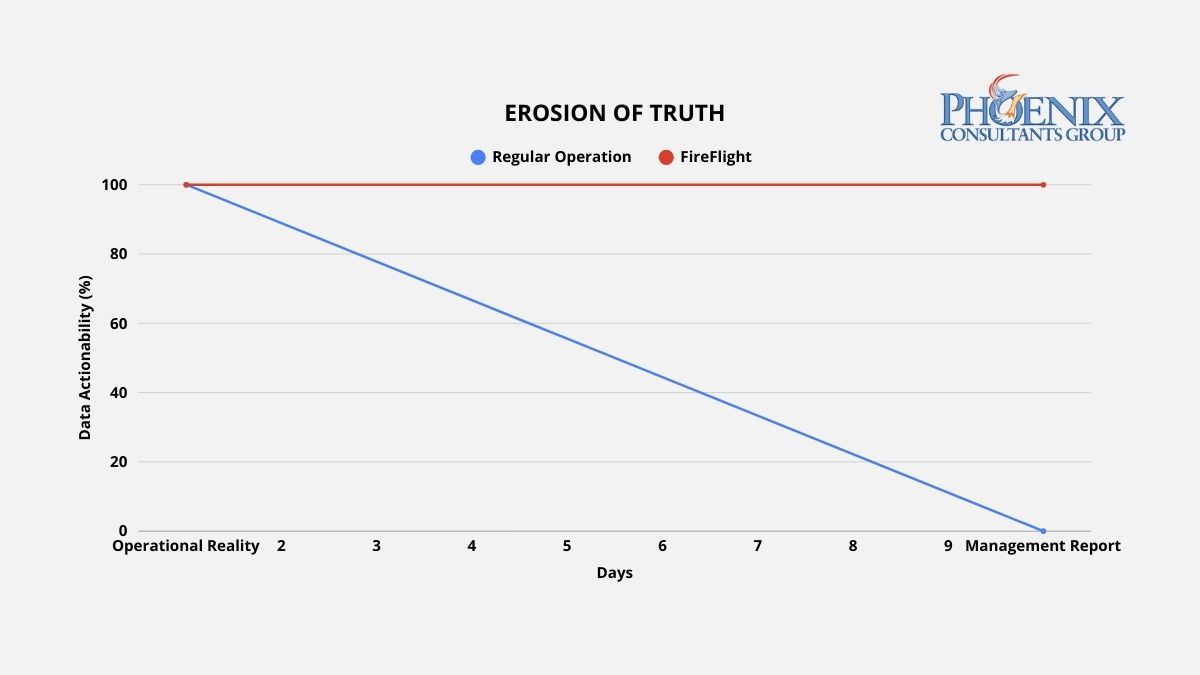
A 10-day reporting lag means every significant operational decision your leadership team makes is based on data that no longer describes what is actually happening. Variance corrections arrive after the corrective window closes. Procurement goes out without current inventory numbers. PCG's FireFlight platform delivers live operational data, updated to the last 60 seconds, without a single manual export step.
Why do traditional reports always arrive 10 days late?
Reporting lag is the technical byproduct of a system architecture built around data storage rather than data flow. In a conventional ERP environment, data is generated at the operational level, a sale is logged, a production event is recorded, an inventory movement is entered, and then sits in that system's database until a human exports it, cleans it, reformats it, and assembles it into a report. That process typically runs one to three days for routine reports, and up to a week for cross-departmental analysis that requires merging data from multiple systems.
Each step in that manual assembly introduces two compounding problems. The first is delay: by the time the report is ready, the operational window it describes has already closed. The second is distortion: every reformatting step is an opportunity for a formula error, a mismatched join, or a filtered row that quietly warps what leadership actually sees. High-performance operations do not produce better reports. They eliminate the manual assembly process entirely by replacing static data storage with a live data engine that delivers current information directly to the decision-maker without human intervention.
What does reporting latency actually do to operational decisions?
Reporting latency does not affect all decisions equally, but it affects every decision. The table below maps the operational consequences of three data latency states against weekly staff time consumed and the type of decisions each state produces.1
| Data Latency State | Weekly Hours in Report Prep | Decision Basis | Decision Impact |
|---|---|---|---|
| 7+ Day Lag: Manual / Fragmented ERP | 15-25 hrs | Historical trends. Decisions arrive after the corrective window closes. | Fully reactive. Leadership explains last week's problems instead of preventing this week's. |
| 24-Hour Delay: Standard ERP with Nightly Sync | 5-10 hrs | Yesterday's performance. Corrective, but not proactive. | Corrective. Problems are caught after they occur, not before they compound. |
| FireFlight: Live 60-Second Data Engine | Under 1 hr | Current operational reality. Decisions made at the moment of variance. | Proactive. Variances are visible while corrective action is still low-cost. |
The shift from corrective to proactive is the structural value of real-time architecture. A 24-hour delay lets you respond to yesterday's problems. A 7-day lag forces you to explain last week's problems to a leadership team that needed to act on them five days ago. FireFlight puts data in front of decision-makers when a variance occurs, when corrective action is still low-cost and high-impact, not after the damage is already compounding.
How do I know if my reporting architecture has already failed?
Three operational patterns indicate active reporting lag. Each one represents wasted capacity and delayed decision-making that grows more expensive as the organization grows.
The Export Culture
Your managers cannot answer a basic question about current profitability, production status, or inventory position without clicking "Export to Excel" and building a pivot table. If extracting data from your system requires a manual step before it becomes useful information, the architecture has separated data from intelligence. The export is not a feature. It is evidence that the system does not deliver insights automatically, and the cost of that manual step compounds every day it continues.
The Report Preparation Sink
Your team spends two or more hours preparing data before a weekly leadership meeting. That time is not analysis. It is assembly: the manual labor of moving data from where it lives to where it needs to be read, reformatting it along the way. In a 50-person operation where three or four staff members are involved in report preparation, that represents 300 to 600 hours of productive capacity lost per year to a process that an automated data architecture eliminates entirely.1
The Conflicting Versions Problem
Two departments arrive at the same meeting with different numbers for the same metric. Both are correct for their system, on the date their system last updated. Neither is current. When each department produces its own version of operational reality, leadership cannot make decisions because it cannot determine which version to trust. Real-time architecture does not produce versions. It produces one current truth, visible to every authorized user simultaneously.
How does FireFlight actually eliminate the lag, not just reduce it?
Most ERP vendors offer dashboards as a presentation layer bolted onto a static database. The visual design may be sophisticated. If the underlying data updates on a nightly batch job, the dashboard is showing yesterday's operational state with today's color scheme. Cosmetic improvement on a structural problem is not a solution.
PCG engineers FireFlight as a live data engine where the database and every authorized interface maintain continuous synchronization. The moment an operational event is recorded, a sale closed, a material consumed, a job completed, an invoice generated, that event propagates through the FireFlight architecture in real time. Every relevant metric, every connected module, and every dashboard view that references it updates immediately. No batch job. No reconciliation window. No version lag between what happened and what leadership sees.
FireFlight's reporting architecture provides three distinct dashboard models, each suited to a different decision-making context. Custom dashboards are configured to the specific KPIs your leadership team uses to run the business. Ad-hoc dashboards are assembled from custom SQL queries for advanced users who need on-demand visibility into specific data sets. User-personalized dashboards allow individual managers to configure their own views from a library of approved queries, with permission-based visibility controls that limit each user to the data relevant to their role. All three pull from the same live database, so every view reflects the same current operational reality regardless of who configured it.
What does the process of eliminating reporting lag actually look like?
PCG maps every point in your current operational flow where data is generated, where it gets delayed, and where it requires manual intervention before it becomes useful information. This includes every export step, every manual merge, every scheduled batch job, and every informal process where staff members serve as data conduits between disconnected systems. The output is a complete inventory of your current reporting friction, ranked by the volume of staff time consumed and the decision latency each bottleneck introduces.
PCG deploys the FireFlight data engine to intercept data streams at their point of origin, replacing manual export and reconciliation steps with automated, real-time data flow into the unified FireFlight database. Each dashboard is configured to the specific KPIs identified in the stream mapping phase. The deployment runs in parallel with your existing reporting process so your leadership team can validate FireFlight's live data against the manual reports they currently rely on before the transition is complete.
Once FireFlight is live, your leadership team gains a real-time operational dashboard providing current visibility into every metric that currently requires a manual report: revenue pipeline, production status, inventory position, labor utilization, billing cycle. All updated continuously without staff intervention. The weekly report preparation meeting is replaced by a standing dashboard review where decisions are made on current data. The staff hours previously spent on report preparation are redirected to the analysis and action those reports were supposed to enable.
What experience backs the FireFlight live data architecture?
PCG built FireFlight's live data architecture because the clients who needed real-time intelligence most were precisely the ones whose existing systems were most deeply committed to batch-cycle reporting. Allison Woolbert developed the continuous data flow methodology after more than four decades of engineering systems for environments where a 24-hour reporting lag carries direct operational consequences, including enterprise intelligence systems for ExxonMobil, Nabisco, and AXA Financial.
That same standard applies to every PCG commercial deployment. In the end-to-end scheduling, credentialing, and payroll system PCG built for a multi-facility physician staffing organization, an environment where staffing decisions affect patient care continuity, regulatory compliance, and revenue recognition simultaneously, PCG built a live intelligence architecture that gives operations leadership current visibility into every facility's staffing status, credential compliance position, and payroll cycle in a single dashboard view. No exports. No manual merges. No lag between operational reality and the data used to manage it.
1 Weekly staff hour estimates based on PCG client pre-deployment assessments conducted across 14 mid-market ERP environments, 2022-2025.